
CarInputService架构与接口
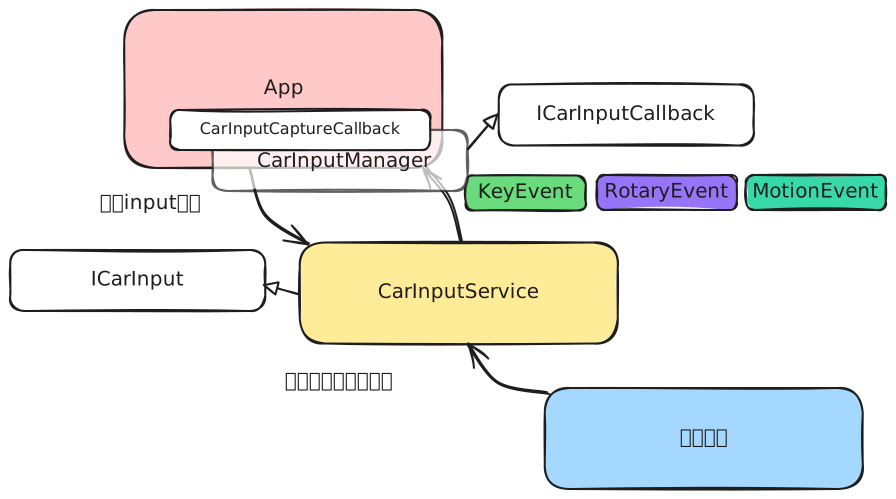
对于关心input事件的应用,可以通过向CarInputService订阅input事件以获取车辆的input事件,主要的input事件分为以下几种:
- 按键事件:对应的数据类型为
KeyEvent,主要包含以下信息:- mKeyCode : 按键编码
- mAction : 按键动作
- mDownTime : 按键按下的事件
- mEventTime : 按键动作发生的事件
- mRepeatCount : 按键的重复次数
- 旋钮事件:对应的数据类型为
RotaryEvent,主要包含以下信息:- mInputType
- mClockwise : 旋钮方向
- mUptimeMillisForClicks : 每个刻度的事件戳
- 滑动事件:对应的数据类型为
MotionEvent,主要包含以下信息:- mNativePtr : 指向nativeMotionEvent对象
- 自定义input事件
CarInputManager通过ICarInput接口向CarInputService订阅input事件:
interface ICarInput {
    //用于创建一个input事件捕获
    int requestInputEventCapture(in ICarInputCallback callback, int targetDisplayType,
        in int[] inputTypes, int requestFlags) = 1;
    //用于释放一个input事件捕获
    void releaseInputEventCapture(in ICarInputCallback callback, int targetDisplayType) = 2;
    //用于模拟注入一个key事件
    void injectKeyEvent(in KeyEvent event, int targetDisplayType) = 3;
}
CarInputService通过IcarInputCallback接口向CarInputManager通知input事件:
oneway interface ICarInputCallback {
    void onKeyEvents(int targetDisplayType, in List<KeyEvent> keyEvents) = 1;
    void onRotaryEvents(int targetDisplayType, in List<RotaryEvent> events) = 2;
    void onCaptureStateChanged(int targetDisplayType, in int[] activeInputTypes) = 3;
    void onCustomInputEvents(int targetDisplayType, in List<CustomInputEvent> events) = 4;
}
CarInputManger通过CarInputCaptureCallback接口向应用通知input事件:
public interface CarInputCaptureCallback {
    default void onKeyEvents(@DisplayTypeEnum int targetDisplayType,
            @NonNull List<KeyEvent> keyEvents) {}

    default void onRotaryEvents(@DisplayTypeEnum int targetDisplayType,
            @NonNull List<RotaryEvent> events) {}

    default void onCaptureStateChanged(@DisplayTypeEnum int targetDisplayType,
            @NonNull @InputTypeEnum int[] activeInputTypes) {}

    default void onCustomInputEvents(@DisplayTypeEnum int targetDisplayType,
            @NonNull List<CustomInputEvent> events) {}
}
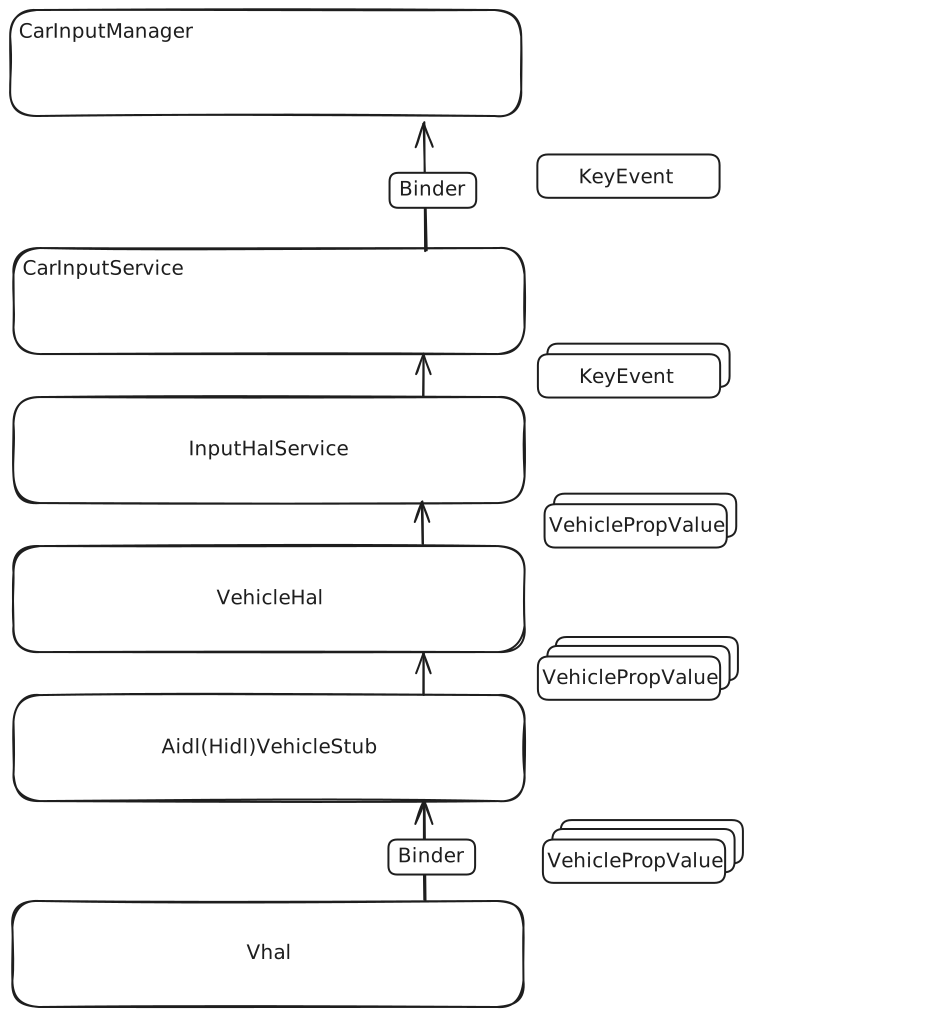
CarInputService负责监听input事件,并将事件分发给关心该事件的其他应用,主要由以下几部分构成:
- CarInputManager : CarInputManger是应用访问CarInputService的接口,提供订阅input事件和回调的方法;
- CarInputService :CarInputService根据不同的input事件类型,将其发送给订阅input的client;
- InputHalService :InputHalService会订阅与input事件有关的车辆属性,获取车辆属性变化并转化为相应的input事件。
下图为CarInputService的架构图:
CarInputService的初始化
CarInputService构造函数
CarInputService包含了一个公共构造函数和一个私有构造函数,公共构造函数传入一些与input事件有关的其他CarXXXService,并进行一些默认构造
public CarInputService(Context context, InputHalService inputHalService,
        CarUserService userService, CarOccupantZoneService occupantZoneService,
        CarBluetoothService bluetoothService, CarPowerManagementService carPowerService,
        SystemInterface systemInterface, UserManager userManager) {
    this(context, inputHalService, userService, occupantZoneService, bluetoothService,
            carPowerService, systemInterface,
            new Handler(getCommonHandlerThread().getLooper()),//创建用于处理消息的handler
            context.getSystemService(TelecomManager.class),//通信服务
            new KeyEventListener() {
                @Override
                public void onKeyEvent(KeyEvent event, @DisplayTypeEnum int displayType,
                        @VehicleAreaSeat.Enum int seat) {
                    InputManagerHelper.injectInputEvent(
                            context.getSystemService(InputManager.class), event);
                }
            },//默认的按键事件监听器
            /* defaultMotionHandler= */ event -> InputManagerHelper.injectInputEvent(
                    context.getSystemService(InputManager.class), event),//默认的motion处理器
            ...
            new InputCaptureClientController(context) // 构造input捕获客户端控制器
            , userManager);
}

@VisibleForTesting
CarInputService(Context context, InputHalService inputHalService, CarUserService userService,
        CarOccupantZoneService occupantZoneService, CarBluetoothService bluetoothService,
        CarPowerManagementService carPowerService, SystemInterface systemInterface,
        Handler handler, TelecomManager telecomManager,
        KeyEventListener defaultKeyHandler, MotionEventListener defaultMotionHandler,
        Supplier<String> lastCalledNumberSupplier, IntSupplier longPressDelaySupplier,
        BooleanSupplier shouldCallButtonEndOngoingCallSupplier,
        InputCaptureClientController captureController,
        UserManager userManager) {
    //根据公共构造函数的传入赋值
    mContext = context;
    mCaptureController = captureController;
    mInputHalService = inputHalService;
    mUserService = userService;
    mCarOccupantZoneService = occupantZoneService;
    mCarBluetoothService = bluetoothService;
    mCarPowerService = carPowerService;
    mSystemInterface = systemInterface;
    mTelecomManager = telecomManager;
    mDefaultKeyHandler = defaultKeyHandler;
    mDefaultMotionHandler = defaultMotionHandler;
    mLastCalledNumberSupplier = lastCalledNumberSupplier;
    mLongPressDelaySupplier = longPressDelaySupplier;
    mUserManager = userManager;

    //为语音和呼叫设置计时器
    mVoiceKeyTimer =
            new KeyPressTimer(
                    handler, longPressDelaySupplier, this::handleVoiceAssistLongPress);
    mCallKeyTimer =
            new KeyPressTimer(handler, longPressDelaySupplier, this::handleCallLongPress);

    mRotaryServiceComponentName = mContext.getString(R.string.rotaryService);
    mShouldCallButtonEndOngoingCallSupplier = shouldCallButtonEndOngoingCallSupplier;

    //注册监听 HOME 和 POWER 按键的按键监听器
    registerKeyEventListener(mDefaultSpecialKeyHandler,
            Arrays.asList(KeyEvent.KEYCODE_HOME, KeyEvent.KEYCODE_POWER));
}
CarInputService的初始化方法
这一步主要会去设置监听InputHalService
public void init() {
    //检查是否支持key事件
    if (!mInputHalService.isKeyInputSupported()) {
        Slogf.w(TAG, "Hal does not support key input.");
        return;
    }
    Slogf.d(TAG, "Hal supports key input.");
    //设置InputHalService的input事件监听
    mInputHalService.setInputListener(this);
    //监听用户生命周期
    UserLifecycleEventFilter userSwitchingEventFilter = new UserLifecycleEventFilter.Builder()
            .addEventType(USER_LIFECYCLE_EVENT_TYPE_SWITCHING).build();
    mUserService.addUserLifecycleListener(userSwitchingEventFilter, mUserLifecycleListener);
    //获取驾驶座
    mDriverSeat = mCarOccupantZoneService.getDriverSeat();
    //判断是否无驾驶座
    mHasDriver = (mDriverSeat != VehicleAreaSeat.SEAT_UNKNOWN);
}
InputHalService构造函数
InputHalService的构造主要设置了其对应的VehicleHal:
public InputHalService(VehicleHal hal) {
    this(hal, SystemClock::uptimeMillis);
}

@VisibleForTesting
InputHalService(VehicleHal hal, LongSupplier uptimeSupplier) {
    mHal = hal;
    mUptimeSupplier = uptimeSupplier;
}
应用请求input事件监听
调用CarInputManager的requestInputEventCapture方法
CarInputManager提供了两种requestInputEventCapture方法,在第一个方法中,通过获取CarInputManager的handler作为callback的执行器,并调用了第二种方法:
@SystemApi
@RequiresPermission(anyOf = {PERMISSION_FRAMEWORK_MONITOR_INPUT,
        Car.PERMISSION_CAR_MONITOR_INPUT})
@InputCaptureResponseEnum
@AddedInOrBefore(majorVersion = 33)
public int requestInputEventCapture(@DisplayTypeEnum int targetDisplayType,
        @NonNull @InputTypeEnum int[] inputTypes,
        @CaptureRequestFlags int requestFlags,
        @NonNull CarInputCaptureCallback callback) {
    Handler handler = getEventHandler();
    return requestInputEventCapture(targetDisplayType, inputTypes, requestFlags, handler::post,
            callback);
}

@SystemApi
@RequiresPermission(anyOf = {PERMISSION_FRAMEWORK_MONITOR_INPUT,
        Car.PERMISSION_CAR_MONITOR_INPUT})
@InputCaptureResponseEnum
@AddedInOrBefore(majorVersion = 33)
public int requestInputEventCapture(@DisplayTypeEnum int targetDisplayType,
        @NonNull @InputTypeEnum int[] inputTypes,
        @CaptureRequestFlags int requestFlags,
        @NonNull @CallbackExecutor Executor executor,
        @NonNull CarInputCaptureCallback callback) {
    Objects.requireNonNull(executor);
    Objects.requireNonNull(callback);

    synchronized (mLock) {
        //向mCarInputCaptureCallbacks记录dispalyType对应的回调
        mCarInputCaptureCallbacks.put(targetDisplayType,
                new CallbackHolder(callback, executor));
    }
    try {
        //调用CarInputService的requestInputEventCapture方法
        return mService.requestInputEventCapture(mServiceCallback, targetDisplayType,
                inputTypes, requestFlags);
    } catch (RemoteException e) {
        return handleRemoteExceptionFromCarService(e, INPUT_CAPTURE_RESPONSE_FAILED);
    }
}
,requestInputEventCapture接收targetDisplayType, inputTypes, callback等作为参数,分别表示希望捕获input的显示器类型,希望捕获的input类型以及回调处理对象。
CarInputManager通过mCarInputCaptureCallbacks记录不同displayType上的回调,mCarInputCaptureCallbacks是一个targetDisplayType到CallbackHolder的SparseArray:
private final SparseArray<CallbackHolder> mCarInputCaptureCallbacks = new SparseArray<>(1);
,CallbackHolder的定义如下:
private static final class CallbackHolder {

    final CarInputCaptureCallback mCallback;

    final Executor mExecutor;

    CallbackHolder(CarInputCaptureCallback callback, Executor executor) {
        mCallback = callback;
        mExecutor = executor;
    }
}
,其实就是callback和其执行器的组合。
调用CarInputService的requestInputEventCapture方法
private final InputCaptureClientController mCaptureController;

@Override
public int requestInputEventCapture(ICarInputCallback callback,
        @DisplayTypeEnum int targetDisplayType,
        int[] inputTypes, int requestFlags) {
    return mCaptureController.requestInputEventCapture(callback, targetDisplayType, inputTypes,
            requestFlags);
}
这一步只是调用mCaptureController的requestInputEventCapture方法。
调用InputCaptureClientController的requestInputEventCapture
public int requestInputEventCapture(ICarInputCallback callback,
        @DisplayTypeEnum int targetDisplayType,
        int[] inputTypes, int requestFlags) {
    //进行一些前置的检查
    ...
    //判断是否要求捕获所有事件
    boolean isRequestingAllEvents =
            (requestFlags & CarInputManager.CAPTURE_REQ_FLAGS_TAKE_ALL_EVENTS_FOR_DISPLAY) != 0;
    //继续进行一些检查
    ...
    Arrays.sort(inputTypes);
    IBinder clientBinder = callback.asBinder();
    //是否允许延迟授予捕获权限
    boolean allowsDelayedGrant =
            (requestFlags & CarInputManager.CAPTURE_REQ_FLAGS_ALLOW_DELAYED_GRANT) != 0;
    int ret = CarInputManager.INPUT_CAPTURE_RESPONSE_SUCCEEDED;
    ...
    //创建一个用于获取对应显示器类型的client对象
    ClientsToDispatch clientsToDispatch = new ClientsToDispatch(targetDisplayType);
    synchronized (mLock) {
        //获取targetDisplayType对应的回调对象与client信息的map
        HashMap<IBinder, ClientInfoForDisplay> allClientsForDisplay = mAllClients.get(
                targetDisplayType);
        //更新targetDisplayType下的client对象信息map
        if (allClientsForDisplay == null) {
            allClientsForDisplay = new HashMap<IBinder, ClientInfoForDisplay>();
            mAllClients.put(targetDisplayType, allClientsForDisplay);
        }
        ClientInfoForDisplay oldClientInfo = allClientsForDisplay.remove(clientBinder);

        //创建targetDisplayType下的fullCapturersStack
        LinkedList<ClientInfoForDisplay> fullCapturersStack = mFullDisplayEventCapturers.get(
                targetDisplayType);
        if (fullCapturersStack == null) {
            fullCapturersStack = new LinkedList<ClientInfoForDisplay>();
            mFullDisplayEventCapturers.put(targetDisplayType, fullCapturersStack);
        }

        //如果不是client不是请求捕获所有事件,且存在一个不是client的全捕获事件,且不允许延迟授予捕获的话,返回错误信息
        if (!isRequestingAllEvents && fullCapturersStack.size() > 0
                && fullCapturersStack.getFirst() != oldClientInfo && !allowsDelayedGrant) {
            // full capturing active. return failed if not delayed granting.
            return CarInputManager.INPUT_CAPTURE_RESPONSE_FAILED;
        }
        // 这一步创建client的信息并设置对client远程对象的生命周期监控
        ClientInfoForDisplay newClient = new ClientInfoForDisplay(Binder.getCallingUid(),
                Binder.getCallingPid(), callback, targetDisplayType,
                inputTypes, requestFlags);
        try {
            newClient.linkToDeath();
        } catch (RemoteException e) {
            // client died
            Slogf.i(TAG, "requestInputEventCapture, cannot linkToDeath to client, pid:"
                    + Binder.getCallingUid());
            return CarInputManager.INPUT_CAPTURE_RESPONSE_FAILED;
        }

        //创建targetDispalyType下的perInputStacks
        SparseArray<LinkedList<ClientInfoForDisplay>> perInputStacks =
                mPerInputTypeCapturers.get(targetDisplayType);
        if (perInputStacks == null) {
            perInputStacks = new SparseArray<LinkedList<ClientInfoForDisplay>>();
            mPerInputTypeCapturers.put(targetDisplayType, perInputStacks);
        }

        //如果请求全部捕获
        if (isRequestingAllEvents) {
            //如果全捕获栈不为空,则删除栈顶部client被授权的input类型并移除client对应的旧信息
            if (!fullCapturersStack.isEmpty()) {
                ClientInfoForDisplay oldCapturer = fullCapturersStack.getFirst();
                if (oldCapturer != oldClientInfo) {
                    oldCapturer.mGrantedTypes.clear();
                    clientsToDispatch.add(oldCapturer);
                }
                fullCapturersStack.remove(oldClientInfo);
            } else {
                //否则对每个input的栈执行类似上述的操作
                for (int i = 0; i < perInputStacks.size(); i++) {
                    LinkedList<ClientInfoForDisplay> perTypeStack = perInputStacks.valueAt(i);
                    if (!perTypeStack.isEmpty()) {
                        ClientInfoForDisplay topClient = perTypeStack.getFirst();
                        if (topClient != oldClientInfo) {
                            topClient.mGrantedTypes.clear();
                            clientsToDispatch.add(topClient);
                        }
                        // Even if the client was on top, the one in back does not need
                        // update.
                        perTypeStack.remove(oldClientInfo);
                    }
                }
            }
            //将新的client加入到全捕获栈上
            fullCapturersStack.addFirst(newClient);
        //如果不是全捕获
        } else {
            boolean hadFullCapture = false;
            boolean fullCaptureActive = false;
            //如果全捕获栈不为空,则从全捕获栈中移除旧的client信息并将全捕获权限给栈顶client
            //如果有一个不是client的另一个全捕获请求,则延迟授予对应input type的授予
            if (fullCapturersStack.size() > 0) {
                if (fullCapturersStack.getFirst() == oldClientInfo) {
                    fullCapturersStack.remove(oldClientInfo);
                    // Now we need to check if there is other client in fullCapturersStack
                    if (fullCapturersStack.size() > 0) {
                        fullCaptureActive = true;
                        ret = CarInputManager.INPUT_CAPTURE_RESPONSE_DELAYED;
                        ClientInfoForDisplay topClient = fullCapturersStack.getFirst();
                        topClient.mGrantedTypes.clear();
                        topClient.mGrantedTypes.add(CarInputManager.INPUT_TYPE_ALL_INPUTS);
                        clientsToDispatch.add(topClient);
                    } else {
                        hadFullCapture = true;
                    }
                } else {
                    // other client doing full capturing and it should have DELAYED_GRANT flag.
                    fullCaptureActive = true;
                    ret = CarInputManager.INPUT_CAPTURE_RESPONSE_DELAYED;
                }
            }

            //执行完上述操作后,需要从每个input的栈中删除掉旧的client信息,并将input的捕获权限赋予client
            for (int i = 0; i < perInputStacks.size(); i++) {
                LinkedList<ClientInfoForDisplay> perInputStack = perInputStacks.valueAt(i);
                perInputStack.remove(oldClientInfo);
            }
            for (int inputType : inputTypes) {
                LinkedList<ClientInfoForDisplay> perInputStack = perInputStacks.get(
                        inputType);
                if (perInputStack == null) {
                    perInputStack = new LinkedList<ClientInfoForDisplay>();
                    perInputStacks.put(inputType, perInputStack);
                }
                if (perInputStack.size() > 0) {
                    ClientInfoForDisplay oldTopClient = perInputStack.getFirst();
                    if (oldTopClient.mGrantedTypes.remove(Integer.valueOf(inputType))) {
                        clientsToDispatch.add(oldTopClient);
                    }
                }
                if (!fullCaptureActive) {
                    newClient.mGrantedTypes.add(inputType);
                }
                perInputStack.addFirst(newClient);
            }

            //这一步检查是否存在某些input栈上的栈顶client没有被授予对应input的捕获权限
            if (!fullCaptureActive && hadFullCapture) {
                for (int i = 0; i < perInputStacks.size(); i++) {
                    int inputType = perInputStacks.keyAt(i);
                    LinkedList<ClientInfoForDisplay> perInputStack = perInputStacks.valueAt(
                            i);
                    if (perInputStack.size() > 0) {
                        ClientInfoForDisplay topStackClient = perInputStack.getFirst();
                        if (topStackClient == newClient) {
                            continue;
                        }
                        if (!topStackClient.mGrantedTypes.contains(inputType)) {
                            topStackClient.mGrantedTypes.add(inputType);
                            clientsToDispatch.add(topStackClient);
                        }
                    }
                }
            }
        }
        //更新targetDisplayType对应的回调对象与client信息的map
        allClientsForDisplay.put(clientBinder, newClient);
        dispatchClientCallbackLocked(clientsToDispatch);
    }
    return ret;
}
在上述过程中,会为每个client创建一个ClientInfoForDisplay类型的对象,其定义如下:
private final class ClientInfoForDisplay implements IBinder.DeathRecipient {
    private final int mUid;
    private final int mPid;
    private final ICarInputCallback mCallback;
    private final int mTargetDisplayType;
    private final int[] mInputTypes;
    private final int mFlags;
    private final ArrayList<Integer> mGrantedTypes;
    ...
}
,其中与捕获相关的信息包括回调对象的信息,目标显示器类型,希望捕获的input类型以及被授予捕获权限的input类型。对targetDisplayType,会创建一个ClientsForDispatch对象:
private static final class ClientsToDispatch {
    // The same client can be added multiple times. Keeping only the last addition is ok.
    private final ArrayMap<ICarInputCallback, int[]> mClientsToDispatch =
            new ArrayMap<>();
    private final int mDisplayType;

    private ClientsToDispatch(int displayType) {
        mDisplayType = displayType;
    }

    private void add(ClientInfoForDisplay client) {
        int[] inputTypesToDispatch;
        if (client.mGrantedTypes.isEmpty()) {
            inputTypesToDispatch = EMPTY_INPUT_TYPES;
        } else {
            inputTypesToDispatch = client.mGrantedTypes.stream().mapToInt(
                    Integer::intValue).toArray();
        }
        mClientsToDispatch.put(client.mCallback, inputTypesToDispatch);
    }
}
,主要用于记录targetDisplayType上回调对象和其可以回调的input类型。
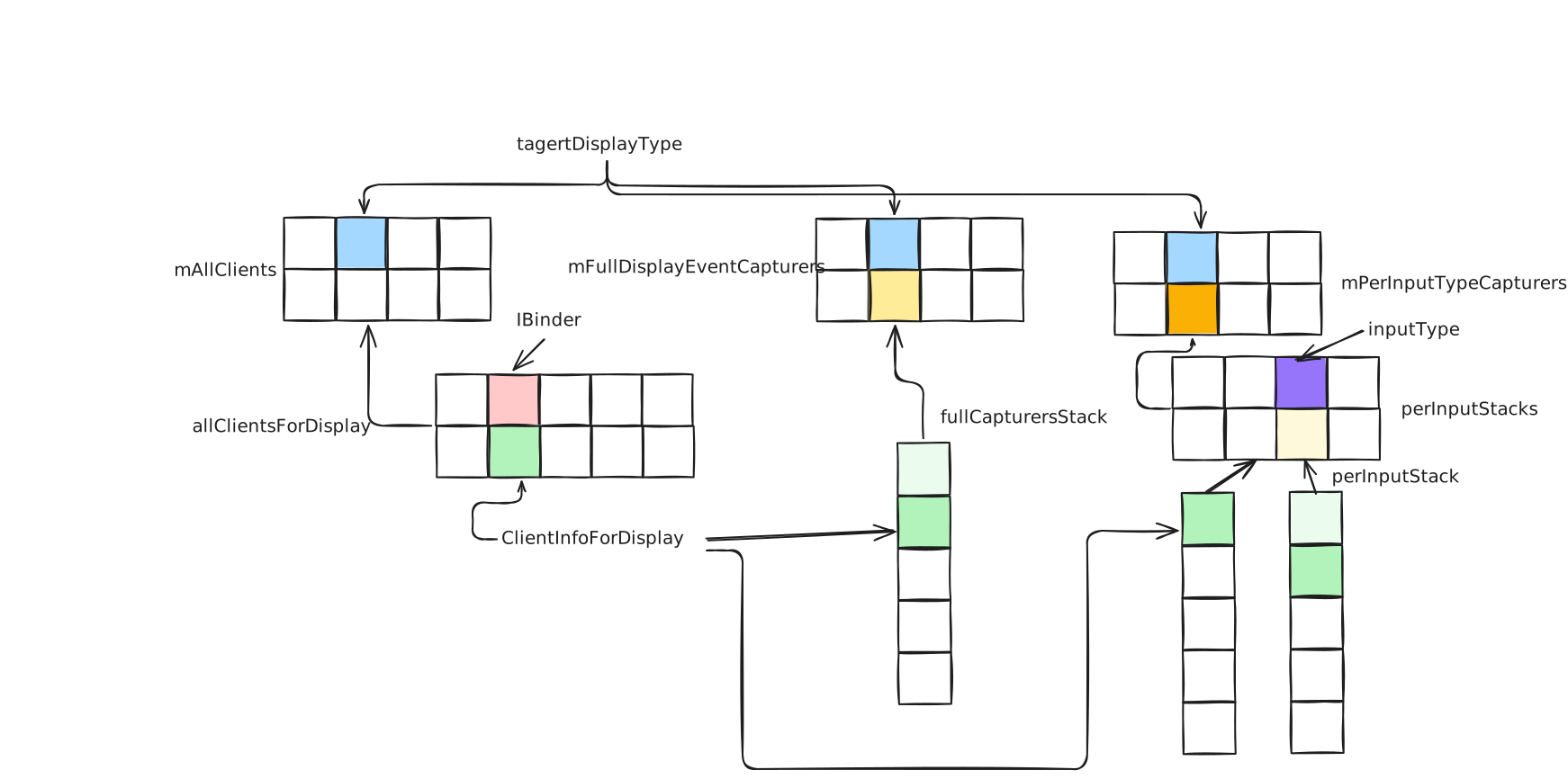
在InputCaptureClientController中,会通过mAllClients保存每种目标显示器类型对应的回调对象与ClientInfoForDisplay的map,其定义如下:
private final SparseArray<HashMap<IBinder, ClientInfoForDisplay>> mAllClients = new SparseArray<>(1);
。 在InputCaptureClientController中,存在两种类型的捕获栈,一种用于请求捕获全部input类型事件的client的栈,另一个种是捕获部分input事件的client栈,分别定义为:
private final SparseArray<LinkedList<ClientInfoForDisplay>> mFullDisplayEventCapturers =
        new SparseArray<>(2);

private final SparseArray<SparseArray<LinkedList<ClientInfoForDisplay>>>
        mPerInputTypeCapturers = new SparseArray<>(2);
于是,在InputCaptureClientController中,用于记录捕获信息的存储表现如下:
更新捕获信息的流程如下所示:
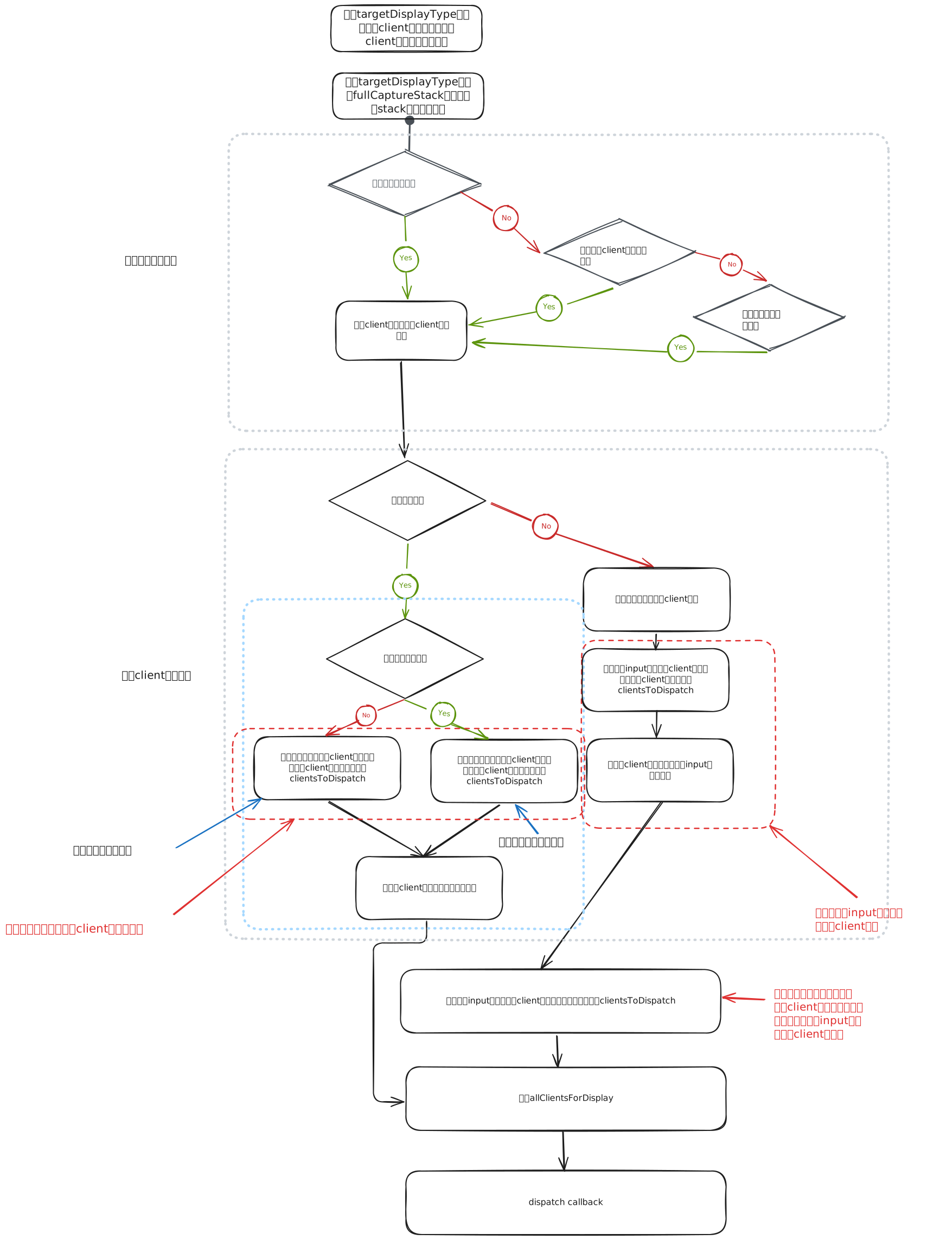
上面一段捕获信息的更新主要为了如下目的:
- 同一时刻一种input类型上至多存在一个被授权的client捕获;
- 优先处理全捕获栈上的client捕获;
调用dispatchClientCallbackLocked方法
dispatchClientCallbackLocked方法主要用于向
private void dispatchClientCallbackLocked(ClientsToDispatch clientsToDispatch) {
    if (clientsToDispatch.mClientsToDispatch.isEmpty()) {
        return;
    }
    ...
    //把需要通知的client加入到mClientDispatchQueue
    mClientDispatchQueue.add(clientsToDispatch);
    //通过公用线程执行捕获状态通知
    CarServiceUtils.runOnCommon(() -> {
        ClientsToDispatch clients;
        synchronized (mLock) {
            if (mClientDispatchQueue.isEmpty()) {
                return;
            }
            clients = mClientDispatchQueue.pop();
        }
        ...
        for (int i = 0; i < clients.mClientsToDispatch.size(); i++) {
            ICarInputCallback callback = clients.mClientsToDispatch.keyAt(i);
            int[] inputTypes = clients.mClientsToDispatch.valueAt(i);
            Arrays.sort(inputTypes);
            ...
            try {
                //通知捕获状态改变
                callback.onCaptureStateChanged(clients.mDisplayType, inputTypes);
            } catch (RemoteException e) {
                // Ignore. Let death handler deal with it.
            }
        }
    });
}
根据requestInputEventCapture,主要有以下几类client需要被通知捕获状态的改变:
- 新加入的client成为新input类型的栈顶元素,需要通知旧的栈顶元素捕获状态改变;
- 新加入的client从全捕获降级为了部分捕获,这是一些input类型的栈顶元素重新获得捕获权限,需要通知捕获状态改变;
input事件监听的回调
VehicleHal回调InputHalService的onHalEvents方法
public void onHalEvents(List<HalPropValue> values) {
    InputListener listener;
    synchronized (mLock) {
        listener = mListener;
    }
    ...
    for (int i = 0; i < values.size(); i++) {
        HalPropValue value = values.get(i);
        switch (value.getPropId()) {
            case HW_KEY_INPUT:
                dispatchKeyInput(listener, value);
                break;
            case HW_KEY_INPUT_V2:
                dispatchKeyInputV2(listener, value);
                break;
            case HW_MOTION_INPUT:
                dispatchMotionInput(listener, value);
                break;
            case HW_ROTARY_INPUT:
                dispatchRotaryInput(listener, value);
                break;
            case HW_CUSTOM_INPUT:
                dispatchCustomInput(listener, value);
                break;
            default:
                Slogf.e(TAG, "Wrong event dispatched, prop:0x%x", value.getPropId());
                break;
        }
    }
}
,这一步根据不同的property id,调用不同的dispatch方法,下面针对key事件讨论回调的流程
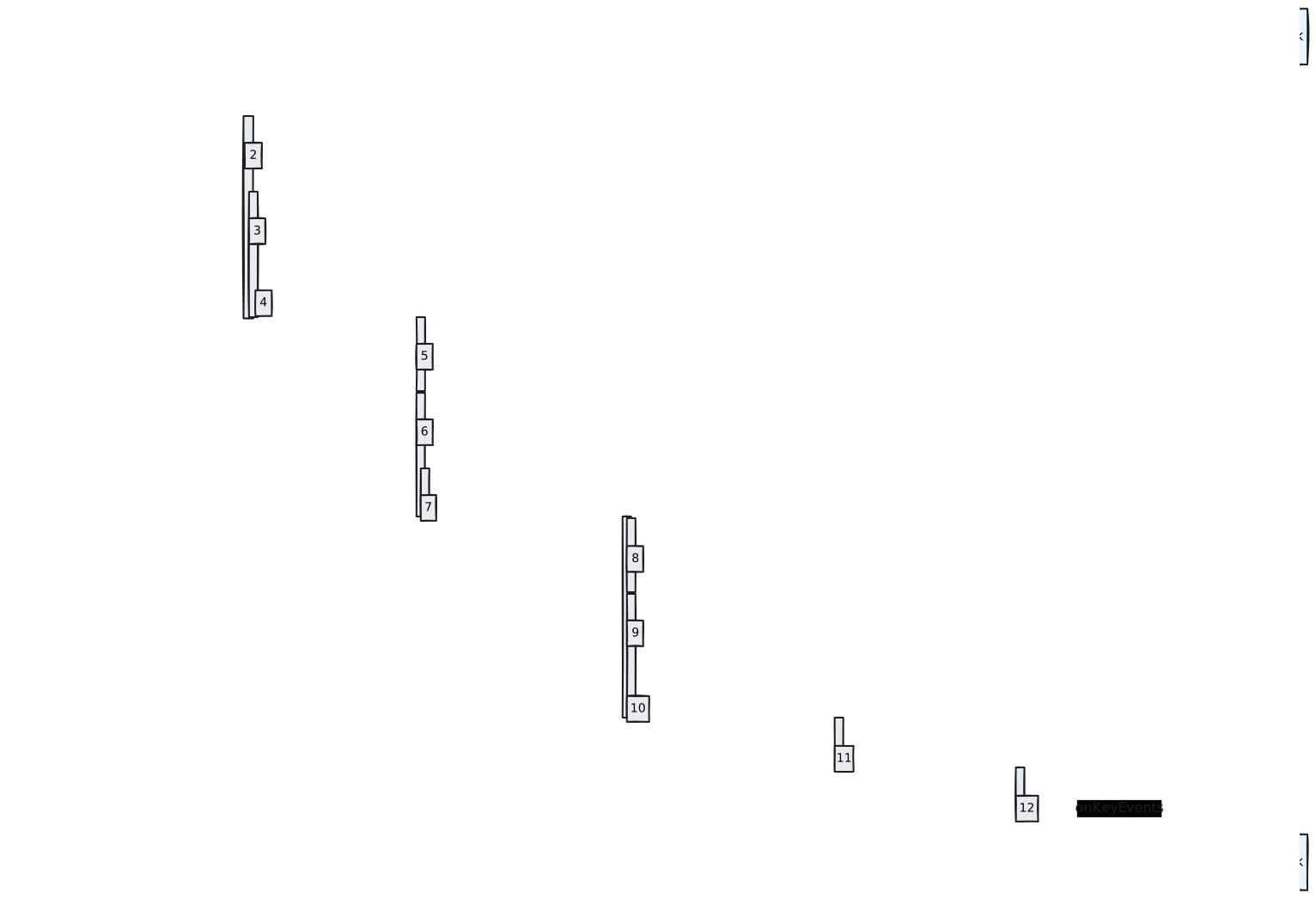
对于key事件
调用dispatchKeyInput方法
private void dispatchKeyInput(InputListener listener, HalPropValue value) {
    int action;
    int code;
    int vehicleDisplay;
    int indentsCount;
    try {
        action = (value.getInt32Value(0) == VehicleHwKeyInputAction.ACTION_DOWN)
                ? KeyEvent.ACTION_DOWN
                : KeyEvent.ACTION_UP;//第一位是按键动作,包含up和down两种动作
        code = value.getInt32Value(1);//第二位是按键编码
        vehicleDisplay = value.getInt32Value(2);//第三位是显示器类型,即监听时附带的targetDisplayType
        indentsCount = value.getInt32ValuesSize() < 4 ? 1 : value.getInt32Value(3);//缩进量,即这一次动作代表多少次动作
        ...
    }
    ...
    while (indentsCount > 0) {
        indentsCount--;
        dispatchKeyEvent(listener, action, code, convertDisplayType(vehicleDisplay));//重复dispatchKeyEvent方法
    }
}
调用dispatchKeyEvent
private void dispatchKeyEvent(InputListener listener, int action, int code,
        @DisplayTypeEnum int display) {
    dispatchKeyEvent(listener, action, code, display, mUptimeSupplier.getAsLong());
}

private void dispatchKeyEvent(InputListener listener, int action, int code,
        @DisplayTypeEnum int display, long eventTime) {
    long downTime;
    int repeat;

    //首先跟新mKeyStates中的key状态,主要包括上一次DOWN事件的时间以及重复次数
    //并根据mKeyStates中的时间计算downTime和repeat
    synchronized (mKeyStates) {
        KeyState state = mKeyStates.get(code);
        if (state == null) {
            state = new KeyState();
            mKeyStates.put(code, state);
        }

        if (action == KeyEvent.ACTION_DOWN) {
            //如果是DOWN事件,则设置DOWN事件的事件为当前key事件的事件,并将DOWN的repeat次数加1
            downTime = eventTime;
            repeat = state.mRepeatCount++;
            state.mLastKeyDownTimestamp = eventTime;
        } else {
            //如果是UP事件,downTime为上一次DOWN事件的时间
            //重复次数为0,清空上一次down的重复次数
            downTime =
                    (state.mLastKeyDownTimestamp == -1)
                            ? eventTime
                            : state.mLastKeyDownTimestamp;
            repeat = 0;
            state.mRepeatCount = 0;
        }
    }
    //生成一个key事件并通知CarInputService
    KeyEvent event = new KeyEvent(
            downTime,
            eventTime,
            action,
            code,
            repeat,
            0 /* deviceId */,
            0 /* scancode */,
            0 /* flags */,
            InputDevice.SOURCE_CLASS_BUTTON);


    listener.onKeyEvent(event, display);
}
,这一步会通过mKeyStates中缓存的key状态信息创建key事件并更新mKeyStates中key的状态,然后向CarInputService通知key事件
调用onKeyEvent方法
public void onKeyEvent(KeyEvent event, @DisplayTypeEnum int targetDisplayType) {
    onKeyEvent(event, targetDisplayType, mDriverSeat);
}

public void onKeyEvent(KeyEvent event, @DisplayTypeEnum int targetDisplayType,
        @VehicleAreaSeat.Enum int seat) {
    //如果存在驾驶座且seat为未知座位

    //这一步向car power manager通知用户行为信息
    notifyUserActivity(event, targetDisplayType, seat);

    // Driver key events are handled the same as HW_KEY_INPUT.
    //特殊处理驾驶座的key事件
    if (seat == mDriverSeat) {
        dispatchKeyEventForDriver(event, targetDisplayType);
        return;
    }

    // 通知key事件的listener,这一步和应用发起的input捕获无关
    notifyKeyEventListener(event, targetDisplayType, seat);
}
调用dispatchKeyEventForDriver
private void dispatchKeyEventForDriver(KeyEvent event, @DisplayTypeEnum int targetDisplayType) {
    //处理一些特殊的key事件
    switch (event.getKeyCode()) {
        case KeyEvent.KEYCODE_VOICE_ASSIST:
            handleVoiceAssistKey(event);
            return;
        case KeyEvent.KEYCODE_CALL:
            handleCallKey(event);
            return;
        default:
            break;
    }

    assignDisplayId(event, targetDisplayType);

    // 处理一些需要分发到仪表上的事件
    if (targetDisplayType == CarOccupantZoneManager.DISPLAY_TYPE_INSTRUMENT_CLUSTER
            && handleInstrumentClusterKey(event)) {
        return;
    }
    //通过InputCaptureClientController处理key事件
    if (mCaptureController.onKeyEvent(targetDisplayType, event)) {
        return;
    }
    //如果InputCaptureClientController不需要处理该key事件,则通过mDefaultKeyHandler处理key事件
    mDefaultKeyHandler.onKeyEvent(event, targetDisplayType, mDriverSeat);
}
调用InputCaptureClientController的onkeyEvent方法
public boolean onKeyEvent(@DisplayTypeEnum int displayType, KeyEvent event) {
    ...
    //获取一些特殊的keycode对应的input type
    Integer inputType = KEY_EVENT_TO_INPUT_TYPE.get(event.getKeyCode());
    //如果input type为空,则设置为INPUT_TYPE_ALL_INPUTS
    if (inputType == null) { // not supported key
        inputType = CarInputManager.INPUT_TYPE_ALL_INPUTS;
    }
    ICarInputCallback callback;
    //这一步获取displayType和inputType上的已授权监听
    synchronized (mLock) {
        callback = getClientForInputTypeLocked(displayType, inputType);
        if (callback == null) {
            return false;
        }
        mNumKeyEventsDispatched++;
    }
    //将事件发送给该监听
    dispatchKeyEvent(displayType, event, callback);
    return true;
}
调用getClientForInputTypeLocked方法
ICarInputCallback getClientForInputTypeLocked(int targetDisplayType, int inputType) {
    LinkedList<ClientInfoForDisplay> fullCapturersStack = mFullDisplayEventCapturers.get(
            targetDisplayType);
    if (fullCapturersStack != null && fullCapturersStack.size() > 0) {
        return fullCapturersStack.getFirst().mCallback;
    }

    SparseArray<LinkedList<ClientInfoForDisplay>> perInputStacks =
            mPerInputTypeCapturers.get(targetDisplayType);
    if (perInputStacks == null) {
        return null;
    }

    LinkedList<ClientInfoForDisplay> perInputStack = perInputStacks.get(inputType);
    if (perInputStack != null && perInputStack.size() > 0) {
        return perInputStack.getFirst().mCallback;
    }

    return null;
}
,这一步先从全捕获栈中找到一个监听的client,如果找不到,则在perInputStack中找到对应input类型下的第一个监听client
调用dispatchKeyEvent方法
private void dispatchKeyEvent(int targetDisplayType, KeyEvent event,
        ICarInputCallback callback) {
    CarServiceUtils.runOnCommon(() -> {
        mKeyEventDispatchScratchList.clear();
        mKeyEventDispatchScratchList.add(event);
        try {
            callback.onKeyEvents(targetDisplayType, mKeyEventDispatchScratchList);
        }
        ...
    });
}
,这一步在公共线程上执行,回调订阅key事件的callback
调用CarInputManager中实现的ICarInputCallbackImpl::onKeyEvents方法
public void onKeyEvents(@DisplayTypeEnum int targetDisplayType,
        @NonNull List<KeyEvent> keyEvents) {
    CarInputManager manager = mManager.get();
    if (manager == null) {
        return;
    }
    manager.dispatchKeyEvents(targetDisplayType, keyEvents);
}
,这一步会调用CarInputManager的dispatchKeyEvents方法
调用CarInputManager的dispatchKeyEvents方法
private void dispatchKeyEvents(@DisplayTypeEnum int targetDisplayType,
        List<KeyEvent> keyEvents) {
    CallbackHolder callbackHolder = getCallback(targetDisplayType);
    if (callbackHolder == null) {
        return;
    }
    callbackHolder.mExecutor.execute(() -> {
        callbackHolder.mCallback.onKeyEvents(targetDisplayType, keyEvents);
    });
}
,这一步通过注册监听时附带的executor执行回调。